
Werkzeug End of Life - Dates and Lifecycle
Werkzeug is the WSGI utility library that powers Flask, providing the core HTTP request and response handling, routing, and debugging tools most Flask developers use indirectly.
Last updated 28 September 2026
16
Versions tracked
15
At EOL
1
Supported
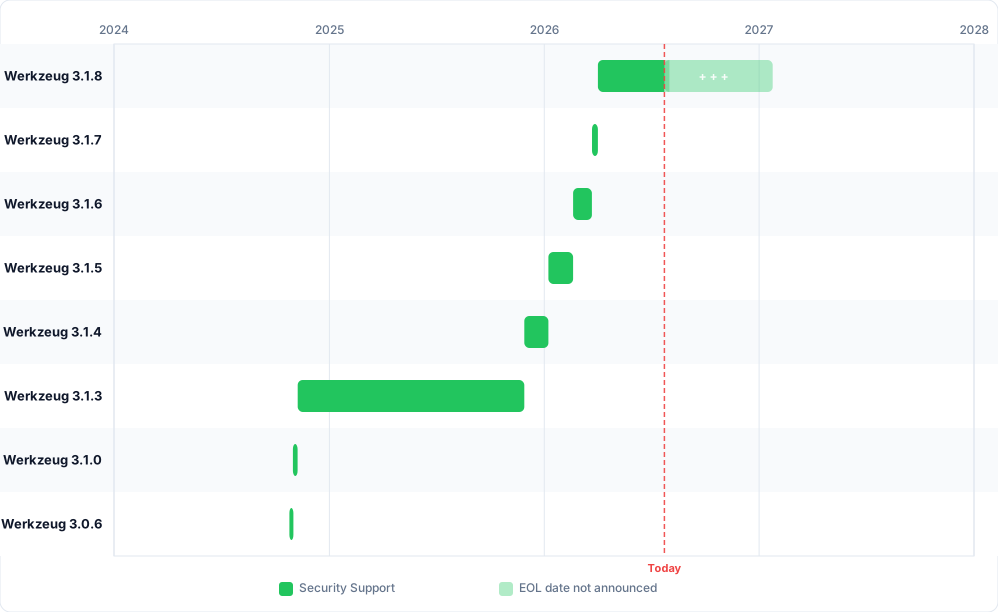
All versions
| Version | Released | Security Support | Latest |
|---|---|---|---|
|
3.1.9
|
27 Sep 2026 |
Active
|
— |
|
3.1.8
|
02 Apr 2026 |
27 Sep 2026
Ended 3 weeks ago
|
— |
|
3.1.7
|
23 Mar 2026 |
02 Apr 2026
Ended 6 months, 3 weeks ago
|
— |
|
3.1.6
|
19 Feb 2026 |
23 Mar 2026
Ended 7 months ago
|
— |
|
3.1.5
|
08 Jan 2026 |
19 Feb 2026
Ended 8 months ago
|
— |
|
3.1.4
|
28 Nov 2025 |
08 Jan 2026
Ended 9 months, 2 weeks ago
|
— |
|
3.1.3
|
08 Nov 2024 |
28 Nov 2025
Ended 10 months, 4 weeks ago
|
— |
|
3.1.0
|
31 Oct 2024 |
08 Nov 2024
Ended 1 year, 11 months ago
|
— |
About Werkzeug
If your team uses Flask, you're using Werkzeug, whether or not it shows up explicitly in your dependency list, it sits underneath Flask as a required dependency handling the low-level HTTP plumbing most developers never interact with directly. It's a WSGI utility library from the Pallets project.
Werkzeug Lifecycle Explained
Like most Pallets projects, Werkzeug doesn't publish a formal multi-year support policy. Only the current release line receives updates; once a new version ships, the previous one is effectively retired, with no stated commitment to backport fixes even for security issues, in contrast to some other libraries that at least promise best-effort critical patches after end of life. In practice, this means staying current matters more for Werkzeug than for software with a longer official tail.
Major and minor releases also periodically drop support for older Python versions in step with Python's own release cycle. Werkzeug 3.1.0 dropped Python 3.8, 2.3.0 dropped Python 3.7, 2.1.0 dropped Python 3.6, and 2.0.0 dropped both Python 2 and 3.5 entirely. Upgrading Werkzeug on an old Python interpreter can fail for this reason alone, independent of any application-level compatibility issues.
Security patches have skewed heavily toward one recurring theme recently: Windows-specific path handling in safe_join, the function responsible for safely serving files from a trusted directory. Versions 3.0.6, 3.1.4, 3.1.5, and 3.1.6 all shipped fixes for variations of the same underlying issue, special device names on Windows bypassing the path safety check. That pattern suggests this is a narrow but recurring risk area worth double-checking specifically if you serve files with Werkzeug on Windows.
Frequently Asked Questions
Is Werkzeug still maintained?
Yes. Werkzeug ships regular releases as part of the actively maintained Pallets project ecosystem, which also includes Flask, Jinja, and Click.
Does upgrading Werkzeug break my Flask app?
It can. Flask pins a compatible Werkzeug version range, and Werkzeug periodically removes deprecated APIs or drops old Python version support in its major and minor releases. Check your Flask version's required Werkzeug range before upgrading either package on its own.
What Python versions does Werkzeug support?
It depends on the Werkzeug version, support for older Python releases is dropped over time to match Python's own lifecycle. Recent examples include Werkzeug 3.1.0 dropping Python 3.8 and 2.3.0 dropping Python 3.7, so an old pinned Werkzeug version may cap which Python version you can run.
Is my version of Werkzeug vulnerable?
Possibly, especially if you're several patch releases behind. Werkzeug has shipped multiple security fixes in recent years, including a cluster of related safe_join path-handling issues on Windows across four separate patch releases. Since Werkzeug doesn't guarantee backported fixes for older versions, updating to the current patch release is the only reliable way to confirm you're covered.