
Ubuntu 25.10 "Questing Quokka" reached end of life on July 9, 2026. As of that date, Canonical will no longer provide security patches, bug fixes, or software updates for this release. Systems still running 25.10 will continue to work, but they will begin accumulating unpatched vulnerabilities with no fixes available through standard channels.
This was not an unexpected event. The Ubuntu 25.10 end of life date was set at release – interim Ubuntu releases ship with exactly nine months of support by design. If you are on 25.10 today, the question is not whether to upgrade, but when and to what.
What Ubuntu 25.10 Was – and Who It Was For
Ubuntu 25.10 "Questing Quokka" was released on October 9, 2025 as an interim release – not an LTS. It shipped with Linux kernel 6.17, GNOME 49, and several forward-looking features including Rust-based implementations of sudo and coreutils for improved memory safety, experimental TPM-backed full disk encryption, and early access to nested virtualization on Arm.
What is an interim Ubuntu release?
Ubuntu publishes two types of releases. LTS (Long Term Support) releases come every two years and receive five years of standard security support. Interim releases ship every six months in between and receive only nine months of support. They exist to deliver newer kernels, toolchains, and features ahead of the next LTS – acting as a proving ground, not a production target.
Ubuntu 25.10 was never intended as a long-term platform. Its role was to road-test features – particularly the Rust-based system utilities and TPM encryption improvements – that were being prepared for Ubuntu 26.04 LTS. As Canonical's VP of Ubuntu Engineering put it at release:
"Ubuntu 25.10 is a statement of intent for the next Ubuntu LTS in 2026."
– Jon Seager, VP of Ubuntu Engineering, Canonical
That intent is now fulfilled. Ubuntu 26.04 LTS is available, and 25.10 has reached the end of its intended lifecycle.
The Risks of Staying on Ubuntu 25.10
No Further Security Patches
As of July 9, 2026, any CVE discovered in Ubuntu 25.10 packages will not receive a fix from Canonical. This includes kernel vulnerabilities, library flaws, and application-level issues. Your exposure grows with every day you remain on this release.
The risk compounds over time. As of July 2026, over 2,600 Linux kernel CVEs have already been published this year. On a supported release like 26.04 LTS, most of these receive patches within days. On 25.10, none of them will.
Ubuntu Release Lifecycle at a Glance
Understanding where 25.10 sits in Ubuntu's release model helps clarify why this EOL matters:
| Release | Type | Released | EOL | Status |
|---|---|---|---|---|
| 22.04 LTS (Jammy Jellyfish) | LTS | Apr 2022 | Apr 2027 | Active |
| 24.04 LTS (Noble Numbat) | LTS | Apr 2024 | Apr 2029 | Active |
| 25.04 (Plucky Puffin) | Interim | Apr 2025 | Jan 2026 | EOL |
| 25.10 (Questing Quokka) | Interim | Oct 2025 | Jul 2026 | EOL |
| 26.04 LTS (Resolute Raccoon) | LTS | Apr 2026 | Apr 2031 | Active |
Interim releases follow a predictable pattern – released in October or April, EOL nine months later. Ubuntu 25.10 followed this exactly.
Should You Have Been Running 25.10 in the First Place?
This is worth addressing directly, because it shapes your upgrade strategy.
The Linux community is fairly consistent on this. From a recent Reddit discussion on the Ubuntu 25.10 EOL:
"The purpose of the non .04 releases is to help developers test things, not for generic user use." – u/dinosaursdied
"Any system I prefer to be as stable as possible, or where it's contractually mandated, LTS only. Like my work laptop." – u/magicmulder
"I use the interim releases mainly for new or special hardware... otherwise I tend to use LTS." – u/sockertoppenlabs
The consensus is consistent with Canonical's own design intent: interim releases are for developers, hardware enthusiasts, and early adopters who want the latest kernel and toolchain and are comfortable with the upgrade cadence. For servers, production workloads, or systems where stability and long-term support matter, LTS is the only appropriate choice.
Rule of thumb for production systems
If the system runs workloads you would be paged about at 2am, it should be on an LTS release. Interim releases are fine for development machines, test environments, and personal desktops where you actively want the latest software and are comfortable upgrading every nine months.
Upgrade to Ubuntu 26.04 LTS
The recommended upgrade path from Ubuntu 25.10 is Ubuntu 26.04 LTS "Resolute Raccoon", released April 2026. It is supported until April 2031 under standard maintenance, and until April 2036 with Ubuntu Pro (Expanded Security Maintenance).
Ubuntu 26.04 LTS ships with Linux kernel 7.0, GNOME 50, and the memory-safe utilities that 25.10 helped road-test – including sudo-rs and the Rust-based coreutils. If you were running 25.10 for those features, they are now stable and production-ready in the LTS.
Before you upgrade
Back up your important data and configuration files before starting the upgrade. The process typically takes 20–45 minutes depending on your hardware and network speed. Ensure you have at least 5GB of free disk space before beginning.
Canonical has opened the upgrade path from 25.10 to 26.04 LTS. To upgrade:
sudo apt update && sudo apt upgrade
sudo apt dist-upgrade
sudo do-release-upgrade
After the upgrade completes, reboot and verify:
lsb_release -a
uname -r
You should see Ubuntu 26.04 LTS and Linux kernel 7.x.
Check Your Ubuntu Version
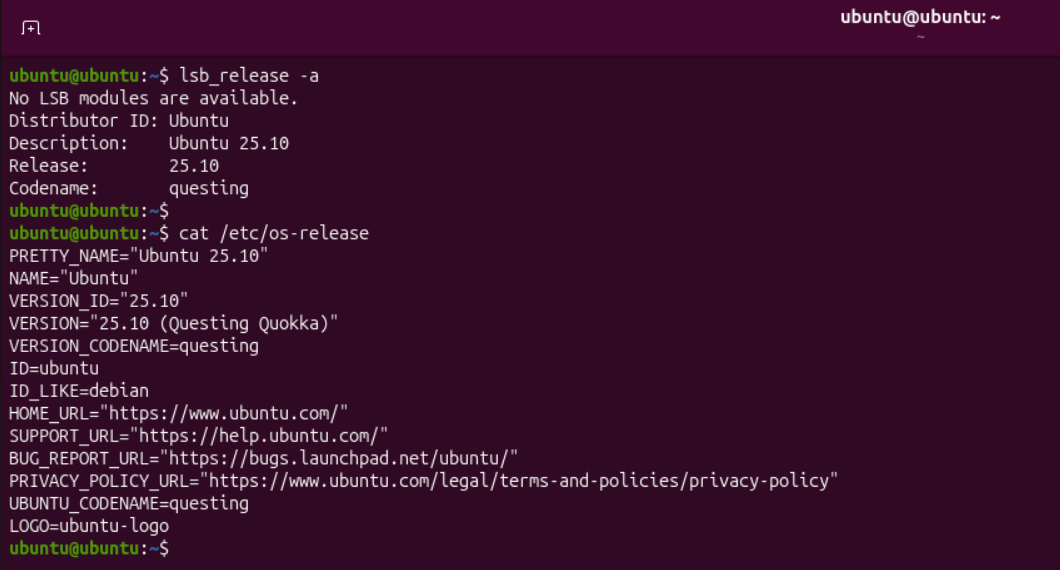
If you are unsure which Ubuntu version your systems are running:
lsb_release -a
Or:
cat /etc/os-release
If the output shows VERSION="25.10" or CODENAME="questing", your system is on the EOL release and should be upgraded.
Summary
Ubuntu 25.10 end of life arrived on July 9, 2026 – exactly as planned. The release served its purpose as an interim stepping stone to Ubuntu 26.04 LTS, delivering features and testing that have now landed in a supported long-term platform.
If you are still running 25.10, upgrade to 26.04 LTS as soon as your schedule allows. The longer you wait, the larger your unpatched CVE exposure grows.
Track the EOL status of Ubuntu releases and other open source software here.